<<#0609 NDS™ Adaptor Q&A >>
Q1. What is
the function of
#0609 NDS™
Adaptor?
A). #0609 NDS™ Adaptor allow user to transfer game saver between NDS™ game cart
and PC.
This function could prevent game saver from being overwritten or damaged.
Q2. What
are
the differences between
#0907 NDS™
Adaptor Plus and
#0609 NDS™ Adaptor?
A). Here are their differences.
|
#0907 NDS™ Adaptor Plus (firmware v3.04) |
#0609 NDS™ Adaptor | |
| Back up game savers from game cart to PC | O | O |
| Support NDS™, NDS™ lite, NDS™ i | O | O |
| Support N3DS™ | O | X |
|
Supports Pokemon™ Black and White 2 Pokemon™ Mystery Dungeon Explorers of Sky Pokemon™ Heart Gold and Soul Silver Pokemon™ Black and White Pokemon™ Platinum Jam with the band DX™ Sengoku Musou Chronicle™ (3DS) Street Fighter™ IV (3DS) Monster Hunter 3G™ (3DS) |
O | X |
| Future firmware upgrade to support new games | O | X |
Q3. How
to set up and use the
#0609 NDS™
Adaptor?
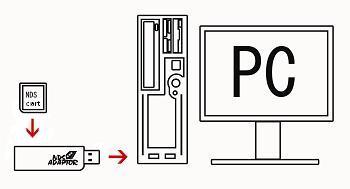
A). Please follow the guide below to set up the #0609 NDS™ Adaptor.
1. Connect
the #0609 NDS™ Adaptor to PC USB port. (see the figure below)
2. For the first time to use this product, PC will pop up a hardware install
wizard and
ask for driver. Please direct it to the location of the provided driver files.
3. Run the provided #0609 NDS™ Adaptor program.
4. Connect a NDS™ game cart to the adaptor. The
program would detect the game cart,
show up the USB logo and cart volume.
5. User could upload or download game savers via the program.
For details, please see the user manual here (PDF format)
Q4. My
computer could not recognize the
#0609 NDS™
Adaptor,
what could I do?
A). If your computer could only recognize an unknown USB device, please test
with another
USB port or use an USB hubs.
Q5. I have tried all of the above method, but seems my NDS™ cart doesn't compatible with
the
#0609 NDS™
Adaptor,
what's wrong ? (last update : 16-9-09)
A). Please note that our
#0609 NDS™
Adaptor supports most Nintendo official NDS™
game carts,
which may not be able to support some of those 3rd party game carts in the market.
Q6. Does
#0609 NDS™
Adaptor support 64bit windows?
A). Yes, no problem.
email : sales@hkems.com
This Is Not A Nintendo Official Product