
Q&A section
Q1) What is #0508 EMS TopGun ?
A) #0508 EMS TopGun is the first light gun to support every kind of screens,
include LCD, Plasma and
Projector, as well as traditional CRT TV. (i.e. normal TV) It supports PS3™, PS2™, Xbox™ and PC.
Q2) What are the differences amount #0807 RF TopGun, #0508 EMS TopGun and #0718 EMS TopGun II ?
A) Here are the differences:
| (#0807) RF TopGun | (#0718) EMS TopGun II | (#0508) EMS TopGun | |
| console supported | PS3™ PS2™ PC | PS3™ PS2™ PC XBOX™ | PS3™ PS2™ PC XBOX™ |
| OS supported |
Vista (32bit) / XP (32bit) 2k / ME / 98 / 98 SE |
Vista (32bit) / XP (32bit) 2k / ME / 98 / 98 SE |
XP (32bit) / 2k ME / 98 / 98 SE |
| support all screen | O | O | O |
| wireless | O | X | X |
| accuracy | excellent | excellent | excellent |
| recoil | X | O | O |
| laser pointer | X | O | O |
| auto fire | O | O | O |
| auto reload | O | O | O |
Q3) How to set up and use
the #0508 EMS TopGun?
A) First, you have to put the two LED stand beside the screen. Then, you
have to connect the
#0508 EMS TopGun to your PC or console (PS2™/ Xbox™), note that you have to select the switch
at the bottom of the gun to "X" for Xbox™, and "P" for PS2™ or PC. And then, after you have well
calibrated the gun, you can use the gun. For details, please see the User Manual.
Q4) The #0508 EMS TopGun is not accurate at all even I re-calibrate it for many times. Why is that?
A) It may be because there are some infrared source behind or beside the screen. such that
the #0508 EMS TopGun system is interrupted.
Q5) How to prevent the #0508 EMS TopGun from being
interrupted ?
A) To solve this problem, please make sure that no infrared source is behind or beside the
screen. Possible infrared source include sun light, strong red light, yellow light, or any very
heat source. Also, the ground may reflect the light (infrared) from the LED stand. To
prevent reflection, please place a cloth on the ground near the screen so as to prevent the
reflection.
Q6) What should I do if
there is something wrong during the calibrating process ?
A) For this case, you can press start + select at the same time during the
calibrating process,
and it would escape from the calibrating mode, and you can re-start the calibrating process
again. For details, please see the calibration guide in the User Manual.
Q7) What is the best screen size for the #0508 EMS TopGun ?
A) Recommend screens size is 14-60 inch, which is the best for the #0508 EMS TopGun. For screen of
size 14-60 inch, please place the LED stand beside the screen as the the figure below:
.jpg)
Q8) What is the difference between the two versions of TopGun, #0508 and #0508(0902) ?
A) The function of the two versions are the same. One of the differences is that, the LED stands
of #0508 and #0508(0902) are different. Please refer to the following pictures.
LED stands for #0508

LED stands for #0508(#0902)

Moreover, the hardware calibration procedure for #0508 and #0508(0902) are different.
For #0508, user have to shoot 6 points (A-F) in the hardware calibration mode.
For #0508(0902), user have to shoot 5 points (A-E) in the hardware calibration mode.
#0508 #0508(0902)
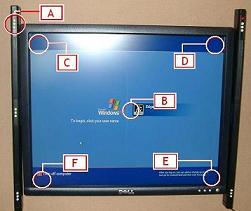
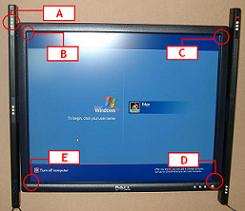
Q9) Could I use #0508 and #0508(0902) in the same screen ?
A) No, as the LED stands of them are different.
Q10) How should I set up the LED stand if my projector is larger then 60 inch ?
A) If your screen is between 60-120 inch, you can put the LED stand in the middle of the
screen as shown in the picture below :
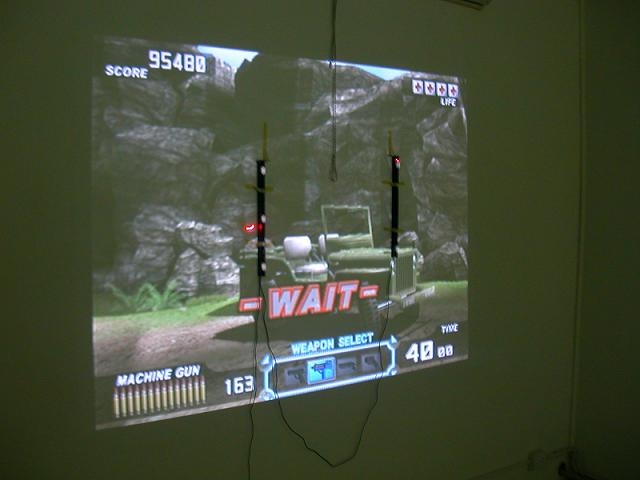
The performance of the #0508 EMS TopGun will not be affected even you put the LED stand in the
middle. But please note that you must stand within 5 meters from the screen, or it is too long for
the gun to receive the signal from the LED stand.
Q11) Could I place the two LED stands behind the cloth Projector screen ?
A ) We have tried that it is workable to place the LED stands behind the cloth projector screen. But please note that our cloth projector screen may be thinner then yours. Also, the cloth screen would decrease the brightness of the infrared from the LEDs, thus the workable range for the gun should be less the normal (5m). Moreover, the life of the LEDs are limited (like normal light bulbs), it would become dimmer and dimmer (very slowly) and die finally in several years. When the LED become dimmer and dimmer and to a certain level, it would not be workable behind the cloth screen.
Q12) Could I use two #0508 EMS TopGun to play at the same time ?
A) Yes, you can use two #0508 EMS TopGun at the same time in Xbox™, PS2™ and PC. Please note that
when you use two #0508 EMS TopGun at the same time on the same screen, you just need to setup
one set of LED stands. Otherwise it would fail to work.
Q13) The TopGun works perfectly in PS2, but I can't enter Calibration mode in PC, what's the
matter ?
A) Please make sure that the driver is workable (without a interjection mark beside it), unless you
could not use the gun nor enter the calibration mode in PC.
Q14) The TopGun works perfectly in PC, but I can't enter Calibration mode in PS2, what's the
matter ?
A) If you connect the gun to PS2 before you turn on the PS2 and it doesn't work, please re-connect
the gun and see if it is ok.
Q15) In the calibration mode of a PS2 gun game, the PS2 fail to recognize the shoot, what's the
matter ?
A) It is very likely caused by bad contact. Please disconnect and re-connect the TopGun without
reboot the PS2 console.
Q16) Would a VGA box be required for PC?
A) No, it is not required.
Q17) Does TopGun support PS1 gun shooting games on PS2 console?
A) Please note that you could not use any PS2 lightgun (GunCon2 compatible lightgun) to play PS1 gun
shooting game on PS2 console. To play Area 51 on PS2 console, you have to use a PS1 compatible
lightgun. TopGun is a
GunCon2 compatible lightgun, which would not support Area 51 in PS2.
Q18) In PS2, could I use the TopGun together with PS2 joypads ?
A) In gun shooting games, if you connect a joypad to player 1, the USB input 1 would be disabled.
Therefore, if you are going to use the TopGun, you should not connect the joypad to PS2.
Q19) How do you recommend to
fix the LED stands ?
A) You could use BLU-TACK to fix the LED stand on the wall or besides your screen. It is some kind
of plastic which would not leave any scratches on the wall or screen. Please see the related links
of BLU-TACK from these Useful Links.
Q20) How is TopGun different from other guns in the market ?
A) Please see the comparison here .
Q21) I find that my TopGun always miss in the calibration mode in the game Time Crisis 2.
What's the matter ?
A) Please note the followings when you use the gun.
i) You must load the game first before you connect the gun to the console.
ii) Before you start the software calibration in the game Time Crisis 2, you must finish the
hardware calibration first. Please refer to the manual.
email : sales@hkems.com